hugo入门

hugo入门1 安装
管理员身份运行cmd,执行以下
1@"%SystemRoot%\System32\WindowsPowerShell\v1.0\powershell.exe" -NoProfile -InputFormat None -ExecutionPolicy Bypass -Command "iex ((New-Object System.Net.WebClient).DownloadString('https://chocolatey.org/install.ps1'))" && SET "PATH=%PATH%;%ALLUSERSPROFILE%\chocolatey\bin"
输入y/a同意安装
1Do you want to run the script?([Y]es/[A]ll - yes to all/[N]o/[P]rint):
校验安装
1C:\Users\13237>choco
2
3Chocolatey v0.10.15
4Please run 'choco -?' or 'choco <command> -?' for help menu.
安装hugo
1C:\Windows\system32>choco install hugo
2Chocolatey v0.10.15
3Installing the following packages:
4hugo
5By installing you accept licenses for the packages.
6
7....
8
校验 hugo
1C:\Windows\system32>hugo version
2Hugo Static Site Generator v0.58.3-4AAC02D4 windows/amd64 BuildDate: 2019-09-19T15:29:19Z
更新hugo
1C:\Windows\system32>choco upgrade hugo
2Chocolatey v0.10.15
3Upgrading the following packages:
4hugo
5By upgrading you accept licenses for the packages.
6hugo v0.58.3 is the latest version available based on your source(s).
同样方法安装git
1C:\Windows\system32>choco install git
2Chocolatey v0.10.15
3Installing the following packages:
4git
5By installing you accept licenses for the packages.
6Progress: Downloading git.install 2.23.0... 24%
更新git
1choco upgrade git
hugo入门2 本地创建网站
打开D盘某个文件夹 地址栏输入cmd 敲回车
创站 站名 123
 1D:\369>hugo new site 123
 2Congratulations! Your new Hugo site is created in D:\369\123.
 3
 4Just a few more steps and you're ready to go:
 5
 61. Download a theme into the same-named folder.
 7   Choose a theme from https://themes.gohugo.io/ or
 8   create your own with the "hugo new theme <THEMENAME>" command.
 92. Perhaps you want to add some content. You can add single files
10   with "hugo new <SECTIONNAME>\<FILENAME>.<FORMAT>".
113. Start the built-in live server via "hugo server".
12
13Visit https://gohugo.io/ for quickstart guide and full documentation.
14
15D:\369>
进入网站文件夹
1D:\369>cd 123
2
3D:\369\123>
初始化git
1D:\369\123>git init
2Initialized empty Git repository in D:/369/123/.git/
下载主题Hello-Friend
1D:\369\123>git submodule add https://github.com/panr/hugo-theme-hello-friend.git themes/hello-friend
2Cloning into 'D:/369/123/themes/hello-friend'...
3remote: Enumerating objects: 1084, done.
4
5
6Receiving objects: 100% (1084/1084), 7.57 MiB | 1.68 MiB/s, done.
7Resolving deltas: 100% (545/545), done.
8warning: LF will be replaced by CRLF in .gitmodules.
9The file will have its original line endings in your working directory
使用Sublime Text打开站文件夹123
编辑config.toml文件
 1baseurl = "/"
 2languageCode = "en-us"
 3theme = "hello-friend"
 4paginate = 5
 5
 6[params]
 7  # dir name of your blog content (default is `content/posts`)
 8  contentTypeName = "posts"
 9  # "light" or "dark"
10  defaultTheme = "dark"
11  # if you set this to 0, only submenu trigger will be visible
12  showMenuItems = 2
13  # Show reading time in minutes for posts
14  showReadingTime = false
15
16[languages]
17  [languages.en]
18    title = "Hello Friend"
19    subtitle = "A simple theme for Hugo"
20    keywords = ""
21    copyright = ""
22    menuMore = "Show more"
23    writtenBy = "Written by"
24    readMore = "Read more"
25    readOtherPosts = "Read other posts"
26    newerPosts = "Newer posts"
27    olderPosts = "Older posts"
28    minuteReadingTime = "min read"
29    dateFormatSingle = "2006-01-02"
30    dateFormatList = "2006-01-02"
31
32    [languages.en.params.logo]
33      logoText = "hello friend"
34      logoHomeLink = "/"
35    # or
36    #
37    # path = "/img/your-example-logo.svg"
38    # alt = "Your example logo alt text"
39
40    [languages.en.menu]
41      [[languages.en.menu.main]]
42        identifier = "about"
43        name = "About"
44        url = "/about"
45      [[languages.en.menu.main]]
46        identifier = "showcase"
47        name = "Showcase"
48        url = "/showcase"
49
50
本地预览网站
 1D:\369\123>hugo server
 2Building sites …
 3                   | EN
 4+------------------+----+
 5  Pages            |  6
 6  Paginator pages  |  0
 7  Non-page files   |  0
 8  Static files     | 16
 9  Processed images |  0
10  Aliases          |  1
11  Sitemaps         |  1
12  Cleaned          |  0
13
14Total in 37 ms
15Watching for changes in D:\369\123\{archetypes,content,data,layouts,static,themes}
16Watching for config changes in D:\369\123\config.toml
17Environment: "development"
18Serving pages from memory
19Running in Fast Render Mode. For full rebuilds on change: hugo server --disableFastRender
20Web Server is available at //localhost:1313/ (bind address 127.0.0.1)
21Press Ctrl+C to stop
22
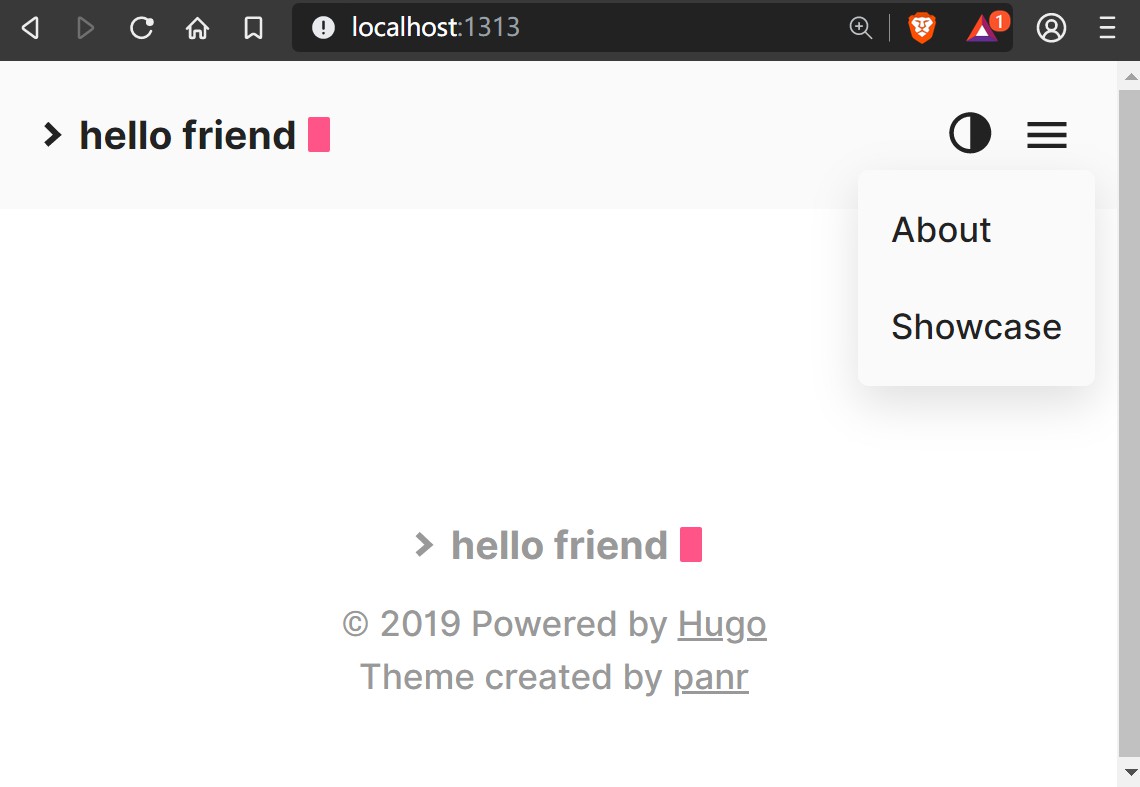
浏览器打开
1//localhost:1313/
局域网预览
1hugo server --bind=192.168.50.50 --baseURL=http://192.168.50.50:1313
hugo入门3 写文章 插图片
cmd进入站文件夹 创建.md
1D:\369\123>hugo new posts/第一篇博客.md
2D:\369\123\content\posts\第一篇博客.md created
Sublime Text打开content/posts/第一篇博客.md
draft: true 改为draft: false
1---
2title: "第一篇博客"
3date: 2019-09-23T12:14:29+08:00
4draft: true
5---
6
7你好,吧唧吧唧!
8
预览
 1D:\369\123>hugo server
 2Building sites …
 3                   | EN
 4+------------------+----+
 5  Pages            |  6
 6  Paginator pages  |  0
 7  Non-page files   |  0
 8  Static files     | 16
 9  Processed images |  0
10  Aliases          |  1
11  Sitemaps         |  1
12  Cleaned          |  0
13
14Total in 37 ms
15Watching for changes in D:\369\123\{archetypes,content,data,layouts,static,themes}
16Watching for config changes in D:\369\123\config.toml
17Environment: "development"
18Serving pages from memory
19Running in Fast Render Mode. For full rebuilds on change: hugo server --disableFastRender
20Web Server is available at //localhost:1313/ (bind address 127.0.0.1)
21Press Ctrl+C to stop
局域网其他设备预览
ip换成自己的
1hugo server --bind=192.168.50.50 --baseURL=http://192.168.50.50:1313
即时预览
CTRL+S
插入图片

网站所有静态文件在public内
hugo入门4 修改菜单栏
打开config.toml文件
追加到[languages.en.menu]下
1[[languages.en.menu.main]]
2  identifier = "YouTube"
3        name = "YouTube"
4         url = "yt.uv/+888"
hugo入门5 修改网站logo
注释logo第一张显示方案
config.toml path= “logo存放位置” 建议白底
1[languages.en.params.logo]
2    #  logoText = ""
3    #  logoHomeLink = "/"
4    #  or
5
6    path = "/pic/logo/logo.png"
7    #  alt = "Your example logo alt text"
8
9
网页页脚
/themes/hello-friend/layouts/partials/footer.html
 1<footer class="footer">
 2  <div class="footer__inner">
 3    {{ if $.Site.Copyright }}
 4      <div class="copyright copyright--user">{{ $.Site.Copyright | safeHTML }} | {{ now.Year }}</div>
 5    {{else}}
 6      {{ partial "logo.html" . }}
 7      <div class="copyright">
 8        <span>© {{ now.Year }} Powered by <a href="https://gohugo.io" target="_blank" rel="noopener">Hugo</a></span>
 9        <span>Theme created by <a href="https://twitter.com/panr" target="_blank" rel="noopener">panr</a></span>
10      </div>
11    {{end}}
12  </div>
13</footer>
14
15<script src="{{ "assets/main.js" | absURL }}"></script>
16<script src="{{ "assets/prism.js" | absURL }}"></script>
17{{- partial "extended_footer.html" . }}
18
19
hugo 6 网页添加发弹幕功能 取消评论区?
在prepended_head.html下加入
1<link href="https://yiyechat.com/open-source/build/content-static/css/main.css" rel="stylesheet">
2
3<script src="https://yiyechat.com/open-source/build/content-static/js/main.js" ></script>
4
hugo 7 自定义404 界面
创建404.html
/themes/hello-friend/layouts/404.html
 1
 2{{ define "main" }}
 3    <div id="spotlight" class="error-404 animated fadeIn">
 4        <p class="img-404">
 5            <svg xmlns="http://www.w3.org/2000/svg" width="24" height="24" viewBox="0 0 24 24" fill="none" stroke="currentColor" stroke-width="2" stroke-linecap="round" stroke-linejoin="round" class="feather feather-cloud-drizzle"><line x1="8" y1="19" x2="8" y2="21"></line><line x1="8" y1="13" x2="8" y2="15"></line><line x1="16" y1="19" x2="16" y2="21"></line><line x1="16" y1="13" x2="16" y2="15"></line><line x1="12" y1="21" x2="12" y2="23"></line><line x1="12" y1="15" x2="12" y2="17"></line><path d="M20 16.58A5 5 0 0 0 18 7h-1.26A8 8 0 1 0 4 15.25"></path></svg>
 6        </p>
 7        <div class="banner-404">
 8            <h1>404</h1>
 9            <p>{{ i18n "notFound" }}</p>
10            <p class="btn-404">
11                <a href="{{.Site.BaseURL}}"><svg xmlns="http://www.w3.org/2000/svg" width="24" height="24" viewBox="0 0 24 24" fill="none" stroke="currentColor" stroke-width="2" stroke-linecap="round" stroke-linejoin="round" class="feather feather-home"><path d="M3 9l9-7 9 7v11a2 2 0 0 1-2 2H5a2 2 0 0 1-2-2z"></path><polyline points="9 22 9 12 15 12 15 22"></polyline></svg>{{ i18n "home" }}</a>
12                <a href="{{ "posts" | absLangURL }}"><svg xmlns="http://www.w3.org/2000/svg" width="24" height="24" viewBox="0 0 24 24" fill="none" stroke="currentColor" stroke-width="2" stroke-linecap="round" stroke-linejoin="round" class="feather feather-archive"><polyline points="21 8 21 21 3 21 3 8"></polyline><rect x="1" y="3" width="22" height="5"></rect><line x1="10" y1="12" x2="14" y2="12"></line></svg>{{ i18n "archives" }}</a>
13            </p>
14        </div>
15    </div>
16{{ end }}
hugo 8 自定义首页
创建index.html
/themes/hello-friend/layouts/index.html
 1{{ define "main" }}
 2    <main aria-role="main">
 3        <div>
 4            <h1>{{ .Site.Title }}</h1>
 5
 6            {{- with .Site.Params.subtitle }}
 7                <p>{{.}}</p>
 8            {{- end }}
 9
10            {{- with .Site.Params.social }}
11                <div>
12                    {{ partial "social-icons.html" . }}
13                </div>
14            {{- end }}
15        </div>
16    </main>
17{{ end }}
新建
/themes/hello-friend/layouts/social-icons.html /themes/hello-friend/layouts/svg.html
/themes/hello-friend/layouts/social-icons.html内容
1{{ range . -}}
2 <a href="{{ .url }}" target="_blank" rel="noopener" title="{{ .name | humanize }}">{{ partial "svg.html" . }}</a>
3{{- end -}}
/themes/hello-friend/layouts/svg.html内容
 1{{- if (eq .name "codepen") -}}
 2    <svg xmlns="http://www.w3.org/2000/svg" width="24" height="24" viewBox="0 0 24 24" fill="none" stroke="currentColor" stroke-width="2" stroke-linecap="round" stroke-linejoin="round" class="feather feather-codepen"><polygon points="12 2 22 8.5 22 15.5 12 22 2 15.5 2 8.5 12 2"></polygon><line x1="12" y1="22" x2="12" y2="15.5"></line><polyline points="22 8.5 12 15.5 2 8.5"></polyline><polyline points="2 15.5 12 8.5 22 15.5"></polyline><line x1="12" y1="2" x2="12" y2="8.5"></line></svg>
 3{{- else if (eq .name "facebook") -}}
 4    <svg xmlns="http://www.w3.org/2000/svg" width="24" height="24" viewBox="0 0 24 24" fill="none" stroke="currentColor" stroke-width="2" stroke-linecap="round" stroke-linejoin="round" class="feather feather-facebook"><path d="M18 2h-3a5 5 0 0 0-5 5v3H7v4h3v8h4v-8h3l1-4h-4V7a1 1 0 0 1 1-1h3z"></path></svg>
 5{{- else if (eq .name "github") -}}
 6    <svg xmlns="http://www.w3.org/2000/svg" width="24" height="24" viewBox="0 0 24 24" fill="none" stroke="currentColor" stroke-width="2" stroke-linecap="round" stroke-linejoin="round" class="feather feather-github"><path d="M9 19c-5 1.5-5-2.5-7-3m14 6v-3.87a3.37 3.37 0 0 0-.94-2.61c3.14-.35 6.44-1.54 6.44-7A5.44 5.44 0 0 0 20 4.77 5.07 5.07 0 0 0 19.91 1S18.73.65 16 2.48a13.38 13.38 0 0 0-7 0C6.27.65 5.09 1 5.09 1A5.07 5.07 0 0 0 5 4.77a5.44 5.44 0 0 0-1.5 3.78c0 5.42 3.3 6.61 6.44 7A3.37 3.37 0 0 0 9 18.13V22"></path></svg>
 7{{- else if (eq .name "gitlab") -}}
 8    <svg xmlns="http://www.w3.org/2000/svg" width="24" height="24" viewBox="0 0 24 24" fill="none" stroke="currentColor" stroke-width="2" stroke-linecap="round" stroke-linejoin="round" class="feather feather-gitlab"><path d="M22.65 14.39L12 22.13 1.35 14.39a.84.84 0 0 1-.3-.94l1.22-3.78 2.44-7.51A.42.42 0 0 1 4.82 2a.43.43 0 0 1 .58 0 .42.42 0 0 1 .11.18l2.44 7.49h8.1l2.44-7.51A.42.42 0 0 1 18.6 2a.43.43 0 0 1 .58 0 .42.42 0 0 1 .11.18l2.44 7.51L23 13.45a.84.84 0 0 1-.35.94z"></path></svg>
 9{{- else if (eq .name "instagram") -}}
10    <svg xmlns="http://www.w3.org/2000/svg" width="24" height="24" viewBox="0 0 24 24" fill="none" stroke="currentColor" stroke-width="2" stroke-linecap="round" stroke-linejoin="round" class="feather feather-instagram"><rect x="2" y="2" width="20" height="20" rx="5" ry="5"></rect><path d="M16 11.37A4 4 0 1 1 12.63 8 4 4 0 0 1 16 11.37z"></path><line x1="17.5" y1="6.5" x2="17.5" y2="6.5"></line></svg>
11{{- else if (eq .name "linkedin") -}}
12    <svg xmlns="http://www.w3.org/2000/svg" width="24" height="24" viewBox="0 0 24 24" fill="none" stroke="currentColor" stroke-width="2" stroke-linecap="round" stroke-linejoin="round" class="feather feather-linkedin"><path d="M16 8a6 6 0 0 1 6 6v7h-4v-7a2 2 0 0 0-2-2 2 2 0 0 0-2 2v7h-4v-7a6 6 0 0 1 6-6z"></path><rect x="2" y="9" width="4" height="12"></rect><circle cx="4" cy="4" r="2"></circle></svg>
13{{- else if (eq .name "slack") -}}
14    <svg xmlns="http://www.w3.org/2000/svg" width="24" height="24" viewBox="0 0 24 24" fill="none" stroke="currentColor" stroke-width="2" stroke-linecap="round" stroke-linejoin="round" class="feather feather-slack"><path d="M22.08 9C19.81 1.41 16.54-.35 9 1.92S-.35 7.46 1.92 15 7.46 24.35 15 22.08 24.35 16.54 22.08 9z"></path><line x1="12.57" y1="5.99" x2="16.15" y2="16.39"></line><line x1="7.85" y1="7.61" x2="11.43" y2="18.01"></line><line x1="16.39" y1="7.85" x2="5.99" y2="11.43"></line><line x1="18.01" y1="12.57" x2="7.61" y2="16.15"></line></svg>
15{{- else if (eq .name "twitter") -}}
16    <svg xmlns="http://www.w3.org/2000/svg" width="24" height="24" viewBox="0 0 24 24" fill="none" stroke="currentColor" stroke-width="2" stroke-linecap="round" stroke-linejoin="round" class="feather feather-twitter"><path d="M23 3a10.9 10.9 0 0 1-3.14 1.53 4.48 4.48 0 0 0-7.86 3v1A10.66 10.66 0 0 1 3 4s-4 9 5 13a11.64 11.64 0 0 1-7 2c9 5 20 0 20-11.5a4.5 4.5 0 0 0-.08-.83A7.72 7.72 0 0 0 23 3z"></path></svg>
17{{- else if (eq .name "youtube") -}}
18    <svg xmlns="http://www.w3.org/2000/svg" width="24" height="24" viewBox="0 0 24 24" fill="none" stroke="currentColor" stroke-width="2" stroke-linecap="round" stroke-linejoin="round" class="feather feather-youtube"><path d="M22.54 6.42a2.78 2.78 0 0 0-1.94-2C18.88 4 12 4 12 4s-6.88 0-8.6.46a2.78 2.78 0 0 0-1.94 2A29 29 0 0 0 1 11.75a29 29 0 0 0 .46 5.33A2.78 2.78 0 0 0 3.4 19c1.72.46 8.6.46 8.6.46s6.88 0 8.6-.46a2.78 2.78 0 0 0 1.94-2 29 29 0 0 0 .46-5.25 29 29 0 0 0-.46-5.33z"></path><polygon points="9.75 15.02 15.5 11.75 9.75 8.48 9.75 15.02"></polygon></svg>
19{{- else if (eq .name "email") -}}
20    <svg xmlns="http://www.w3.org/2000/svg" width="24" height="24" viewBox="0 0 24 24" fill="none" stroke="currentColor" stroke-width="2" stroke-linecap="round" stroke-linejoin="round" class="feather feather-mail"><path d="M4 4h16c1.1 0 2 .9 2 2v12c0 1.1-.9 2-2 2H4c-1.1 0-2-.9-2-2V6c0-1.1.9-2 2-2z"></path><polyline points="22,6 12,13 2,6"></polyline></svg>
21{{- else if (eq .name "telegram") -}}
22    <svg xmlns="http://www.w3.org/2000/svg" width="24" height="24" viewBox="0 0 24 24" fill="none" stroke="currentColor" stroke-width="2" stroke-linecap="round" stroke-linejoin="round" class="feather feather-send"><line x1="22" y1="2" x2="11" y2="13"></line><polygon points="22 2 15 22 11 13 2 9 22 2"></polygon></svg>
23{{- else -}}
24    <svg xmlns="http://www.w3.org/2000/svg" width="24" height="24" viewBox="0 0 24 24" fill="none" stroke="currentColor" stroke-width="2" stroke-linecap="round" stroke-linejoin="round" class="feather feather-link"><path d="M10 13a5 5 0 0 0 7.54.54l3-3a5 5 0 0 0-7.07-7.07l-1.72 1.71"></path><path d="M14 11a5 5 0 0 0-7.54-.54l-3 3a5 5 0 0 0 7.07 7.07l1.71-1.71"></path></svg>
25{{- end -}}
hugo 9 添加disqus评论区
添加如下内容到
/themes/hello-friend/layouts/partials/comments.html
1{{ template "_internal/disqus.html" . }}
hugo 10 添加网站favicons
访问 https://realfavicongenerator.net/ 设置图标
追加如下内容到
/themes/hello-friend/partials/head.html最顶部
1<link rel="apple-touch-icon" sizes="180x180" href="/apple-touch-icon.png">
2<link rel="icon" type="image/png" sizes="32x32" href="/favicon-32x32.png">
3<link rel="icon" type="image/png" sizes="16x16" href="/favicon-16x16.png">
4<link rel="manifest" href="/site.webmanifest">
5<link rel="mask-icon" href="/safari-pinned-tab.svg" color="#000000">
6<meta name="msapplication-TileColor" content="#ffffff">
7<meta name="theme-color" content="#ffffff">
hugo 11 添加google analyse
追加内容到
/themes/hello-friend/partials/prepended.html
代码用自己的 在Google分析后台
1<script async src="https://www.googletagmanager.com/gtag/js?id=UA-148039613-1"></script>
2<script>
3  window.dataLayer = window.dataLayer || [];
4  function gtag(){dataLayer.push(arguments);}
5  gtag('js', new Date());
6
7  gtag('config', 'UA-148039613-1');
8</script>
hugo 12 建立搜索界面 使用algolia为例
config.toml新增如下
 1[outputFormats.Algolia]
 2baseName = "algolia"
 3isPlainText = true
 4mediaType = "application/json"
 5notAlternative = true
 6
 7[params.algolia]
 8vars = ["title", "summary", "date", "publishdate", "expirydate", "permalink"]
 9params = ["categories", "tags","series"]
10
11[outputs]
12home = ["HTML", "RSS", "Algolia"]
13
新建list.algolia.json
1themes/hello-friend/layouts/_default/list.algolia.json
如下
1{{/* Generates a valid Algolia search index */}}
2{{- $.Scratch.Add "index" slice -}}
3{{- $section := $.Site.GetPage "section" .Section }}
4{{- range .Site.AllPages -}}
5  {{- if or (and (.IsDescendant $section) (and (not .Draft) (not .Params.private))) $section.IsHome -}}
6    {{- $.Scratch.Add "index" (dict "date" .Date.UTC.Unix "description" .Description "expirydate" .ExpiryDate.UTC.Unix "fuzzywordcount" .FuzzyWordCount "keywords" .Keywords "kind" .Kind "lang" .Lang "lastmod" .Lastmod.UTC.Unix "permalink" .Permalink "publishdate" .PublishDate "readingtime" .ReadingTime "relpermalink" .RelPermalink "summary" .Summary "title" .Title "type" .Type "url"  .Permalink "weight" .Weight "wordcount" .WordCount "section" .Section "tags" .Params.Tags "categories" .Params.Categories "authors" .Params.Authors)}}
7  {{- end -}}
8{{- end -}}
9{{- $.Scratch.Get "index" | jsonify -}}
下载安装nmp
默认回车 执行
1npm init
2npm install atomic-algolia --save
3
4
package.josn
 1{
 2  "name": "456",
 3  "version": "1.0.0",
 4  "description": "",
 5  "main": "index.js",
 6  "scripts": {
 7    "test": "echo \"Error: no test specified\" && exit 1",     // 修改这里
 8    "algolia": "atomic-algolia"                               // 修改这里
 9  },
10  "repository": {
11    "type": "git",
12    "url": "git+https://scaleya@bitbucket.org/scaleya/777.git"
13  },
14  "author": "",
15  "license": "ISC",
16  "homepage": "https://bitbucket.org/scaleya/777#readme",
17  "dependencies": {
18    "atomic-algolia": "^0.3.17"
19  },
20  "devDependencies": {}
21}
22
touch .env algolia 参数
1ALGOLIA_APP_ID=5SE6G4PQJP
2ALGOLIA_ADMIN_KEY=1f79ea19349ae93e4db7a84f57c70c86  //万能api
3ALGOLIA_INDEX_NAME=123  //索引名称
4ALGOLIA_INDEX_FILE=public/algolia.json
nmp执行
1npm run algolia
新建search界面
/themes/hello-friend/layouts/partials/search.html
1在algolia后台获取
2appId: '5SE6G4PQJP',  id
3indexName: '123',  索引名称
4apiKey: '1f79ea19349ae93e4db7a84f57c70c86' 万能api
 1<!-- Including InstantSearch.js library and styling -->
 2<script src="https://cdn.jsdelivr.net/npm/instantsearch.js@2.6.0/dist/instantsearch.min.js"></script>
 3<script src="https://cdnjs.cloudflare.com/ajax/libs/moment.js/2.20.1/moment.min.js"></script>
 4<link rel="stylesheet" type="text/css" href="https://cdn.jsdelivr.net/npm/instantsearch.js@2.6.0/dist/instantsearch.min.css">
 5<link rel="stylesheet" type="text/css" href="https://cdn.jsdelivr.net/npm/instantsearch.js@2.6.0/dist/instantsearch-theme-algolia.min.css">
 6
 7
 8<div id="search-searchbar"></div>
 9 <div class="post-list" id="search-hits">
10 </div>
11
12
13<script>
14const search = instantsearch({
15  appId: '5SE6G4PQJP',
16  indexName: '123',
17  apiKey: '1f79ea19349ae93e4db7a84f57c70c86'
18});
19
20const hitTemplate = function(hit) {
21/*  if (hit === null){
22      return;
23  }*/
24  let date = '';
25  if (hit.date) {
26    date = moment.unix(hit.date).format('MMM D, YYYY');
27  }
28  let url = `${hit.url}#${hit.anchor}`;
29  const title = hit._highlightResult.title.value;
30
31  let breadcrumbs = '';
32  if (hit._highlightResult.headings) {
33    breadcrumbs = hit._highlightResult.headings.map(match => {
34      return `<span class="post-breadcrumb">${match.value}</span>`
35    }).join(' > ')
36  }
37
38  let content = "" ;
39  if (hit._highlightResult.content){
40      content = hit._highlightResult.content.value;
41  }
42  else{
43      content = hit.summary;
44  }
45
46
47  return `
48    <div class="post-item">
49      <span class="post-meta">${date}</span>
50      <h2><a class="post-link" href="${url}">${title}</a></h2>
51      <a href="${url}" class="post-breadcrumbs">${breadcrumbs}</a>
52      <div class="post-snippet">${content}</div>
53    </div>
54  `;
55}
56
57
58search.addWidget(
59  instantsearch.widgets.searchBox({
60    container: '#search-searchbar',
61    placeholder: 'Search into posts...',
62    poweredBy: true // This is required if you're on the free Community plan
63  })
64);
65
66search.addWidget(
67  instantsearch.widgets.hits({
68    container: '#search-hits',
69    templates: {
70      item: hitTemplate
71    }
72  })
73);
74
75search.start();
76</script>
77
78
79
80
新建 /themes/hello-friend/layouts/search/list.html
1{{ define "main" }}
2
3{{ $isntDefault := not (or (eq (trim $.Site.Params.contentTypeName " ") "posts") (eq (trim $.Site.Params.contentTypeName " ") "")) }}
4{{ $contentTypeName := cond $isntDefault (string $.Site.Params.contentTypeName) "posts" }}
5
6{{ partial "search.html" .}}
7{{ end }}
8
新建search入口
config.toml新增
 1
 2    [languages.en.menu]
 3
 4       [[languages.en.menu.main]]
 5        identifier = "Archive"
 6        name = "Archive"
 7        url = "/archive"
 8        [[languages.en.menu.main]]
 9        identifier = "Posts"
10        name = "Posts"
11        url = "/posts"
12       [[languages.en.menu.main]]    #这个开始
13        identifier = "Search"
14        name = "Search"
15        url = "/search/"
16
17
hugo 13 发布到netlify 或者 自己的vps web服务器上
建立账号bitbucket 新建仓库 绑定netlify
主题 请用 git submodule add 不支持 git clone
git本地到bitbucket
1cd /path/to/your/repo
2Step 2: Connect your existing repository to Bitbucket
3
4git remote add origin git@bitbucket.org:scaleya/8.git
5
6git commit -m "v1.0"
7git push -u origin master
8
netlify 自动编译发布
1Resposity: bitbucket.org/scaleya/777
2Base directory: 默认
3Build command:hugo
4Publish directory: public
5Production branch:master
hugo博客写作语法
git到bitbucket
 1git config --get remote.origin.url
 2
 3
 4git remote set-url origin https://scaleya@bitbucket.org/scaleya/777.git
 5
 6git add .
 7git commit -m " add chinese"
 8git push -f origin master
 9
10git remote add origin https://scaleya@bitbucket.org/scaleya/777.git
11git remote add origin https://scaleya@bitbucket.org/scaleya/mywebsite.git
12git remote set-url origin https://scaleya@bitbucket.org/scaleya/mywebsite.git
13
14git reset --hard commit号
15git push -f origin master
16
局域网共享
1hugo server --bind=192.168.50.50 --baseURL=http://192.168.50.50:1313
表格
| (0,1) | (0,2) | (0,3) |
|---|---|---|
| (1,1) | (1,2) | (1,3) |
| —– | —– | —– |
黄色高亮
hello
hello
CTRL+P
分割线
这是分割线
引用
no way no live
表情
:+1:
任务清单
- 提前三天节目
- hugo文字
- ipad 局域网共享
- 封面ArtWord
- WaterMark
- table content
- 字幕
- 片尾
超链接
视频
Hugo DIY Hugo添加评论区、目录
table of content
1(themes/hello-friend/_default/single.html)
2[32-40]
1   <details class="entry-toc">
2  <summary>
3    <span>
4      Table of contents
5    </span>
6  </summary>
7  {{ .Page.TableOfContents }}
8</details>
评论区
config.toml
1#disqusShortname = "yourdiscussshortname"
2
3disqusShortname = "8-9-30-228"
artword 插入
1<script src="//cdn.wordart.com/wordart.min.js" async defer></script>
2<div style="width: 1280px; height: 720px;" data-wordart-src="//cdn.wordart.com/json/75w62glyievm" data-wordart-show-attribution></div>
hugo algolia搜索添加
1<li></li>
2<div id="content">{{ partial "search" .}}</div>
3<form id="search" role="search" action="/search/">
4<input type="text" name="q" placeholder="Search" />
5</form>
 1$ git clone https://github.com/sourcethemes/academic-kickstart.git My_Website
 2
 3$ ls
 4My_Website/
 5
 6$ cd My_Website/
 7
 8
 9$ git submodule update --init --recursive
10
11
12$hugo server
13
14Building sites …
15                   | EN
16+------------------+----+
17  Pages            | 36
18  Paginator pages  |  0
19  Non-page files   |  1
20  Static files     |  6
21  Processed images |  1
22  Aliases          |  5
23  Sitemaps         |  1
24  Cleaned          |  0
25
26Total in 150 ms
27
28
29
30$ cp -av themes/academic/exampleSite/* .